

Most of the “toxic” backlinks flagged by your audit tool don’t need any action at all. Semrush’s analysis of link risk makes this clear: Google usually ignores low-quality links rather than punishing you for them[4]. At the same time, Google states that pages violating its spam policies may rank lower or not appear in search results at all[1]. Both things are true — which is exactly why founders panic and over-correct. Good toxic backlinks identification is about telling those two situations apart.
Here’s what this guide gives you:
- A signal-based checklist — eight things to check on every suspicious referring domain, instead of trusting one toxicity score.
- A traffic-drop diagnosis — how to confirm links actually caused a ranking loss using Google Search Console.
- A four-bucket triage system — ignore, fix the attribute, request removal, or disavow.
- A prevention routine — how to vet directories, audit vendors, and log every link you build.
Let’s start with the part most guides get wrong: what “toxic” actually means.
1. What Makes Toxic Backlinks Toxic (and What Doesn’t)
Majestic defines toxic backlinks as unnatural links that weaken your organic placement — and stresses that toxicity is context-dependent rather than a fixed label you can stamp on a domain[3]. A link from a small, low-traffic blog might be perfectly natural for one startup and a red flag for another.
Google frames the issue around intent. Its spam policies describe spam as behaviour designed to deceive users or manipulate Search systems[1]. On links specifically:
“Links obtained primarily for artificial manipulation of Search rankings are link spam. Our algorithms and manual actions aim to nullify these unnatural links at scale, and we will continue to improve our coverage.”
Note the word nullify. The default outcome for a junk link is that it stops counting — not that it drags you down. Enforcement happens both algorithmically and through human review, which explains why some spam patterns sail through for months while others end up triggering manual actions[1].
1.1 Low-Quality vs. Genuinely Risky: The Distinction Most Guides Skip
Low-quality but mostly harmless: scraper sites copying your content, random blog comment links, irrelevant foreign-language aggregators, one-off forum mentions. These typically get nullified, not penalised[4].
Genuinely risky: paid link networks, private blog networks (PBNs), bot-generated link blasts, organised link-exchange schemes, and hidden link injections on hacked sites[1][3].
The practical rule: judge the pattern, not the URL. Volume, velocity, anchor uniformity, and network overlap tell you far more than any single referring page.
1.2 The Nine Common Sources of Toxic Backlinks
Semrush groups toxic links into nine sources: paying for links, exchanging links for SEO gain, PBNs, link-building bots, unnatural links posted on other sites, listings on low-quality directories, widgets with embedded links, contract-mandated backlinks, and negative SEO attacks[4].
Four of those hit startups doing off-page work hardest:
- Low-quality directories — mass-submission tools that blast your URL to hundreds of unmoderated sites, which is the opposite of hand-picked startup directory submissions.
- Paid placements — cheap “guest post” packages where money changed hands and nobody added
rel="sponsored". - Widget and footer links — that badge or embeddable calculator you shipped, now sitewide on a thousand templates.
- Contract-mandated links — partner pages, accelerator pages, and investor portfolio listings that require a keyword-rich link back.
Majestic adds two uncomfortable points: negative SEO is real, and links can become problematic retroactively when a tactic that once worked falls out of favour[3]. That’s why identification needs to be a routine, not a one-off cleanup.
2. Toxic Backlinks Identification: A Manual Signal Checklist
Export your referring domains from any backlink tool, then work through this list. One caveat before you start: no tool can determine with certainty whether a link is harmful, so a manual review layer isn’t optional[4].
What tools are good at is scale. Majestic’s Fresh Index alone reports 180,371,329,769 unique URLs crawled and 543,861,958,694 unique URLs found[3]. You can’t spot link networks at that scale by hand — so use the tool to surface patterns, then apply judgement.
2.1 Eight Signals to Check on Every Suspicious Referring Domain
- Low trust relative to your own profile. Majestic highlights low-trust sites and unnatural, keyword-stuffed anchor text as core toxicity signals[3].
- Off-topic linking clusters. An HR SaaS picking up links from casino, loan, and adult pages isn’t earning coverage — it’s inside somebody’s network.
- Anchor text uniformity. The same commercial anchor repeated across dozens of unrelated domains is the clearest fingerprint of paid or automated placement.
- Suspicious velocity. Hundreds of new referring domains in a few days, with no launch, funding round, or press cycle behind it.
- Sitewide placement. Footer, sidebar, and widget links instead of in-content editorial links[4].
- Link-dump pages. Hundreds of outbound links, no editorial standards, no real traffic.
- Hacked-site signals. Injected links, hidden text, or content that clearly doesn’t belong on the page[1][3].
- Directory red flags. Dozens of unrelated categories, instant approval, reciprocal-link demands — the full list is in section 4.1.
2.2 Audit Against Google’s Spam Categories, Not Just Toxicity Scores
A toxicity score is a guess. Google’s spam policies are the actual rulebook — so turn them into your checklist. The categories that matter for link risk are link spam, hidden text and link abuse, doorway abuse, site reputation abuse, and sneaky redirects[1].
Worth knowing: Google’s policies now explicitly cover attempts to manipulate its generative AI responses in Search, so link manipulation risk extends beyond classic blue-link rankings[1][4].
For every flagged link, answer three questions:
- Was it earned editorially, or created to move rankings?
- Is the referring page part of a broader spam pattern?
- Which response does that justify?
That third question needs evidence of real damage — so check performance data before you touch anything.
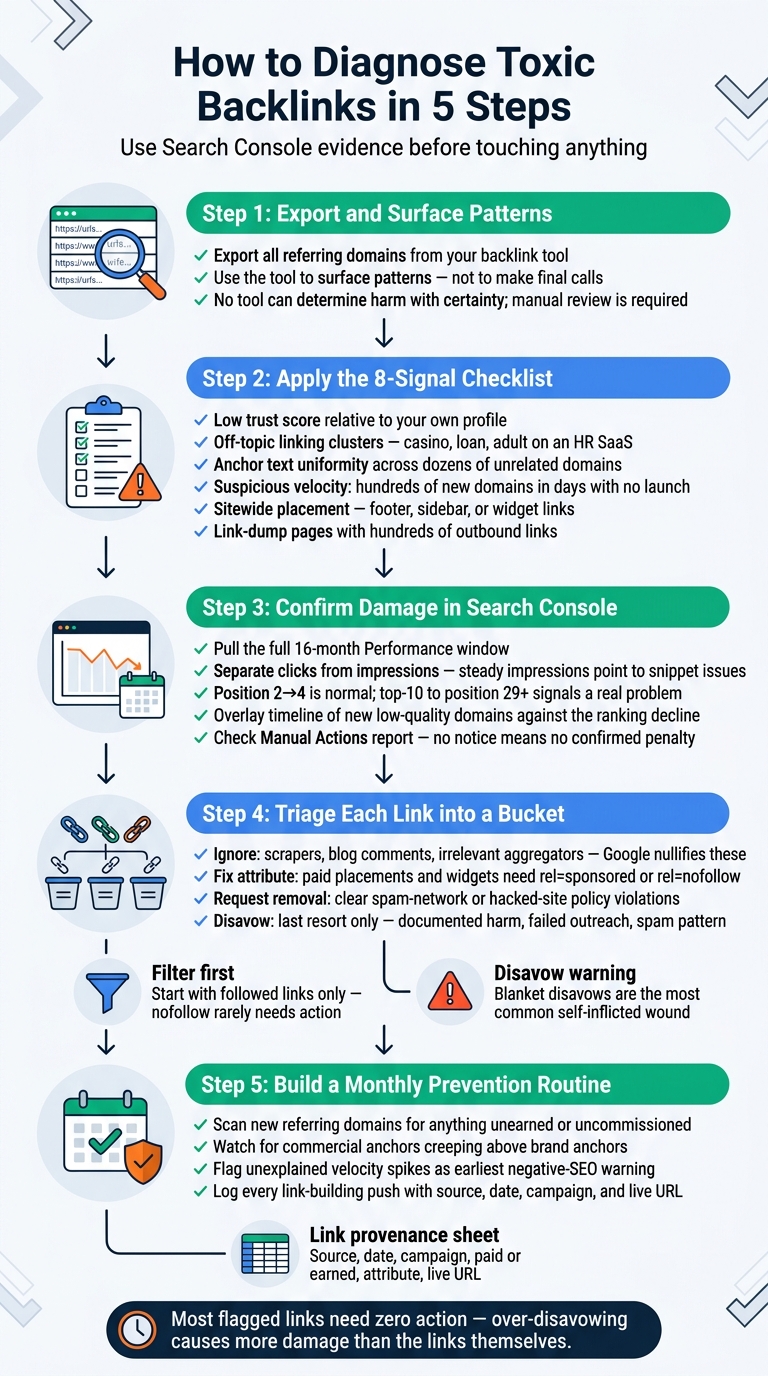
5-Step Toxic Backlink Diagnosis Framework for Startups
3. Confirm Toxic Backlink Damage Before You Clean Up
Google lists spam issues as just one possible cause of an organic traffic drop, alongside algorithmic updates, technical issues, security issues, seasonality, changing user interests, site moves, and plain reporting glitches[2]. Links are rarely the first explanation.
3.1 The Search Console Workflow for Linking Bad Links to Ranking Loss
Step 1 — Compare a 16-month range. In the Search Console Performance report, pull the full 16-month window and review patterns across search types, pages, and queries[2].
Step 2 — Separate clicks from impressions. If both fall together, look for broader causes. If impressions hold steady but clicks fall, the problem is more likely your titles and snippets than your backlinks[2].
Step 3 — Measure severity. Google’s own benchmark helps here: a slide from position 2 to position 4 is normal volatility, while dropping out of the top 10 to position 29 or worse points to a genuine problem[2].
Step 4 — Overlay the timeline. Plot when those new low-quality referring domains appeared against the decline, and check whether the drop is site-wide or isolated to a few pages and queries[2][3].
Step 5 — Check for a manual action. Before you assume a link penalty, open the Manual Actions report. No notice, no confirmed penalty[1].
Once you know what’s real, you can decide what each link deserves.
4. The Startup Triage System: Ignore, Fix, Remove, or Disavow
Semrush’s workflow is three steps: surface links with a tool, review them manually in context, then either remove them, correct the link attribute, or disavow[4]. Combined with Google’s policy categories, that gives you four clean buckets[1].
| Bucket | Typical Link Examples | Why This Action | Effort | Risk of Over-Correcting |
|---|---|---|---|---|
| 1. Ignore | Scraper copies, blog comment links, irrelevant aggregators | Google generally nullifies these already[4] | None | None |
| 2. Fix the attribute | Sponsored posts, paid placements, widget and badge links | Paid or embedded links need rel="sponsored" or rel="nofollow"[4] |
Low — one email per publisher | Low |
| 3. Request removal | Spam networks, hacked-site injections, obvious paid schemes | Clear policy violations you can’t fix with an attribute[1] | Medium — outreach and follow-up | Low |
| 4. Disavow | Documented spam patterns or negative SEO where outreach failed | Last resort, only with evidence of harm[3][4] | High — needs careful file management | High |
The workflow detail that saves time: filter for follow links first, since nofollowed links rarely need attention. Then contact publishers about attributes, and treat disavowal as the final option[4]. Blanket disavows are the most common self-inflicted wound here — Majestic’s profile-first approach and Semrush’s warnings both point out that plenty of suspicious-looking links are either ignored by Google or completely normal for your industry[3][4].
4.1 Vetting Directories: Which Startup Listings Build Authority vs. Risk
“Listing a business on low-quality directories” appears on Semrush’s toxic-source list[4] — and founders read that as “directories are bad.” That’s the wrong takeaway. The problem is directory quality and relevance, not directory submission as a tactic.
| Green flags | Red flags |
|---|---|
| Topical or niche relevance to your market | Dozens of unrelated categories on one domain |
| Human editorial review or moderation | Automatic approval of anything submitted |
| Real referral traffic and indexed profile pages | Keyword-stuffed anchors inside listings |
| Transparent submission rules | Paid “guaranteed DR boost” packages |
| No link-back requirement | Mandatory reciprocal links; doorway-style duplicated location pages[1][4] |
Link building still works — but quality and relevance beat raw volume every time[7]. That’s the logic behind how SR Booster handles startup directory submissions: real people review your profile, hand-pick directories that fit your market, create each listing manually, and deliver a live report with profile links, logins, and screenshots. Every placement is verifiable — so your audit trail exists before you ever need it, and you skip the hours of manual directory research yourself.
4.2 Auditing Outsourced Link Building Before It Becomes Your Problem
Vetting agencies and freelancers matters more in the AI search era, because bad outsourced work transfers risk straight onto your domain[6]. Five questions to ask before you sign:
- Where exactly will the links live? (Ask for a sample placement list.)
- Are any placements paid — and will they be attributed correctly?
- Do I get a URL-level report, not a summary dashboard?
- Is anchor text varied and brand-led?
- Is the work manual, or run by automation?
Vendor red flags: guaranteed DR increases, a fixed number of links per day, “private network” access, and refusal to share the placement list. Google’s August 2025 spam update specifically targeted thin content and link schemes, a reminder that shortcut-heavy SEO invites penalties rather than rankings[5].
Cleanup is expensive; governance is cheap. Here’s the routine.
5. Prevention: Building an Off-Page Profile That Stays Clean
A monthly 30-minute review beats an annual emergency audit. Four things to check:
- New referring domains — scan for anything you didn’t earn or commission.
- Anchor text distribution — watch for commercial anchors creeping above your brand anchors[3].
- Referring-domain velocity — unexplained spikes are your earliest negative-SEO warning[3].
- Campaign log — record every intentional link-building push so future audits have provenance[4].
Keep a simple link provenance sheet with six columns: source, date, campaign, paid or earned, attribute used, live URL. When a traffic drop hits, that sheet answers “did we cause this?” in minutes instead of weeks. It’s also the standard to demand from any submission service — profile links, logins, and screenshots, not a vague count.
One thing founders often mix up: if your new links aren’t moving anything, check whether those profile pages are indexed before you label them toxic. An unindexed listing isn’t a penalty — it’s a page Google hasn’t picked up yet.
A balancing note to close on: backlinks are one signal among many in Google’s ranking systems[8], and link authority genuinely still matters in modern Search[9]. The goal isn’t maximum link volume or zero risk — it’s sustainable relevance. If low organic traffic and a weak Domain Rating are your real problems, the fix is relevant, manually built placements, not another blast.
Conclusion: Key Points to Remember
- Toxicity is contextual. Judge intent and pattern against Google’s spam policies, not a single tool score[1][3].
- Most low-quality links need no action. Over-disavowing is a bigger threat to most startups than the links themselves[4].
- Confirm impact first using the 16-month Search Console comparison and Google’s small-vs-large position-drop benchmark[2].
- Use the four buckets: ignore, fix the attribute, request removal, disavow.
- Prevention beats detox. Vet directories for relevance and editorial review, audit vendors, and log every link you build.
If you want directory-based off-page SEO without inheriting link risk, insist on placements that are manual, relevant, and verifiable. That’s the model SR Booster runs across 120+ startup directories — hand-picked per startup, with a live report you can audit any time.
FAQs
How do I know if backlinks are actually hurting my rankings?
Start in Search Console, not your backlink tool. Compare the 16-month Performance range, separate clicks from impressions, and use Google’s severity guide — position 2 to 4 is normal movement, while falling from the top 10 to position 29 or worse signals a real problem[2]. Also check the Manual Actions report, since spam is only one of many possible causes of a drop[1].
Should you disavow toxic backlinks, or is it safer to leave them alone?
Leave them alone in most cases. Google typically nullifies low-quality links, and many suspicious-looking links are normal for an industry[4][3]. Disavow only after you’ve documented a spam pattern or negative SEO attack, tried removal outreach, and confirmed actual performance damage.
What makes a backlink toxic rather than just low quality?
Intent and pattern. Google defines link spam as links obtained primarily to manipulate Search rankings[4], and Majestic frames toxic links as unnatural links that weaken organic placement in context[3]. A scraper copy is low quality; a paid network with identical anchors across 200 domains is risky.
Are startup directory submissions risky for SEO?
Only when the directories are low quality or irrelevant — that’s the specific risk Semrush flags[4]. Directories with human moderation, topical relevance, indexed profile pages, and no reciprocal-link requirement are normal off-page work, and quality and relevance still outperform volume[7].
How many new backlinks per month look natural to Google?
There’s no published number, and anyone quoting one is guessing. What matters is whether your velocity matches real events — launches, funding news, press cycles — because unexplained spikes and uniform anchors are the patterns that signal manipulation[3][4]. Backlinks are also one signal among many, so steady, relevant growth serves you better than volume targets[8].
Stop doing this manually
We list your startup in 120+ relevant directories — by hand
Every submission is done manually and delivered in a live report with profile links, logins and screenshots, so you can verify each backlink yourself. From $99, one-time.



Leave a Reply