

A small team can handle image SEO alt text by focusing on a few basics. Image SEO means helping Google discover images and helping Google and users understand them through alt text, filenames, and surrounding page context. Google uses alt text alongside computer vision and page content to understand an image’s subject matter.[1]
Missed basics are still common. In a February 2025 sample of the top 1,000,000 home pages, 55.5% had missing alternative text for images.[3] For a startup, that gap is an opportunity:
- Describe meaningful images concisely in natural language, without keyword stuffing.
- Leave decorative images empty with alt=”” so screen readers skip them.
- Use standard HTML and sitemaps so crawlers can find image files.
What alt text does — and what it doesn’t
Alt text has two jobs. For accessibility, it provides a text alternative that can be read aloud or rendered as Braille.[4] For search, Google uses alt text with computer vision and page content to understand an image’s subject matter.[1]
You still need the right page around an image. Google considers page content and nearby text when determining where an image may appear, while image preview selection is automated and not guaranteed.[1] Adding alt text alone does not guarantee rankings, image-search placement, or traffic.
Image-heavy startup pages need a system. In that same sample, 18.5% of all home page images had missing alternative text, across more than 58.6 million images and an average of 58.6 images per home page.[3] If your homepage, pricing page, and docs each load dozens of logos, screenshots, icons, and illustrations, spot fixes will not hold.
Accessible practices can improve usability and discovery, but they are not a startup compliance threat. The U.S. Title II web rule sets WCAG 2.1 Level AA for state and local governments, with compliance dates of April 26, 2027, and April 26, 2028, depending on population. It does not generally apply to startups.[9]
How to write image SEO alt text that works
Google advises writing useful, information-rich alt text in the context of the page, using keywords only where they fit naturally. alt="Dalmatian puppy playing fetch" is helpful; stuffing an alt attribute with phrases like alt="puppy dog baby dog pups puppies dog dogs" creates a poor user experience and may cause the site to be seen as spam.[1]
There is no strict character limit for alt text. Keep it descriptive but not overly long, and avoid starting with “image of” or “picture of”.[6]
Do not use filler just to fill the attribute. In the WebAIM sample, 11% of images with alt text had questionable or repetitive text, such as “image,” “graphic,” a filename, or text identical to nearby copy.[3] That kind of alt text gives little useful information to a screen-reader user or to Google.
You need to optimize file names and alt text: always rename your files using descriptive keywords (e.g., organic-apple-pie-recipe.webp) and write a clear, natural alt attribute (e.g., alt=”Easy organic apple pie recipe”).
— Vincent Hégo, SEO expert, vincenthego.com [7]
Describe informative images briefly
Product screenshots, team photos, and original charts need a short description of essential information, not a pixel-by-pixel inventory.[4] Name the function a visitor needs: “Acme analytics dashboard showing churn by cohort” tells more than “image1.jpg.” For a team photo, add context: “Acme co-founders demoing prototype at booth.”
For complex charts and infographics, keep alt text brief and put the full data in nearby text. That complete equivalent serves screen-reader users and gives search systems more context.[4] [6]
For linked images, describe destination or action
When an image is inside a link or button and is needed to understand the destination, alt text should describe the destination or action, not the appearance.[5] [4] Google also notes that alt text can function like anchor text when an image is used as a link.[1]
Apply this to clickable logos, signup buttons, and directory profile logos. A logo linking to your homepage could use “Acme — home,” not “blue hexagon logo.” A directory profile logo that links to your site should make that destination clear.
Linked images deserve early attention. In the accessibility sample, 44% of images missing alternative text were linked images, and one out of every five linked images was missing alt text.[3] Start by checking linked logos and calls to action.
Leave decorative images empty
Background dividers, flourishes, stock shapes, and icons that repeat nearby text add no meaning. Give those images empty alt text with alt=”” so assistive technology skips them, and use CSS for purely decorative presentation.[4] [5]
If the same information already appears in nearby text, do not repeat it in alt text. Empty alt keeps the page clearer for listeners and leaves more time for screenshots and diagrams that carry meaning.
Help Google discover and understand your images
Use standard HTML with img and src. Google finds images in an img element’s src attribute, even inside a picture element, but does not index CSS background images.[1] Supported formats referenced in src include BMP, GIF, JPEG, PNG, WebP, SVG, and AVIF.[1]
For responsive images, include a src fallback when using srcset or picture, because some browsers and crawlers do not understand those attributes on their own.[1] The fallback makes the image URL available to crawlers and older browsers.
Filenames and placement provide light context clues. A short, hyphenated name like my-new-black-kitten.jpg is better than IMG00023.JPG, and placing the image near relevant text on a relevant page helps Google connect the image to its subject.[1] Rename files before upload and avoid generic names like image1.jpg or pic.gif.
Descriptive filenames and natural alt text work together. As SEO expert Vincent Hégo recommends, rename image files with descriptive terms and write a clear, natural alt attribute.[7]
For images Google might otherwise miss, such as JavaScript-loaded galleries, add an image sitemap or image tags to your existing sitemap. Each image:image tag can contain up to 1,000 image:loc tags. If you use a CDN, verify both domains in Search Console and make sure robots.txt does not block images you want indexed.[2]
Do not add image:caption, image:title, image:license, or image:geo_location. Google has removed these deprecated tags and attributes from its documentation.[2]
Schema.org primaryImageOfPage or image properties and og:image can influence which image Google selects for a preview, but they do not guarantee a particular selection. Choose a relevant, representative, high-resolution image instead of a generic logo or an image with an extreme aspect ratio.[1]
Images are one of the most common WordPress performance optimization issues I come across with my client websites, but it’s usually an easy fix. By uploading them at the right size, using next-gen formats, compressing them, and applying lazy-loading to those below the fold, you’ll be in the green!
— Lucio Laria, Onze Agence SEO [7]
Startup priority workflow: fix high-impact images first
[ORIGINAL] Use this staged checklist to work through a large image library when your team has limited time:
- Linked logos and key product images. Fix your header logo, signup and demo buttons, app-store badges, and top product screenshots.
- Informative content images. Rewrite alt text for blog diagrams, docs screenshots, and pricing visuals that carry useful information.
- Decorative cleanup. Set redundant icons, dividers, and stock flourishes to alt=”” or move them to CSS.
- Bulk remainder. Audit templates, old posts, and resized duplicates in batches.
Neil Patel recommends starting with the most important products when working through a large image library.[8] In one review, more than 1,100 images across about 4% of Carhartt URLs crawled had missing alt text, a missing alt attribute, or alt text over 100 characters. The examined Carhartt product image without alt text did not appear in the cited product-image result, while examined Duluth Trading and Dickies images with alt text did appear.[8] The comparison was observational across three retailers, so other differences may also have affected which images appeared.
Apply the same discipline to startup directories. Profile logos, product screenshots, and cover images need functional or informative alt text where fields allow, descriptive filenames before upload, and consistent URLs. Clear images can help usability and discovery, but they do not themselves create backlinks.
When founders use SR Booster’s manual startup directory submission service, agents prepare directory listings and profile fields, then deliver a live report with profile links and screenshots. Founders still need to supply clean logo and screenshot files with descriptive names and one-sentence, alt-ready descriptions for directories that accept them.
Images aren’t just there to look pretty. Beyond best practices like format and alt attributes, I recommend treating them as standalone media. A well-designed infographic, for example, can easily be shared by others and earn backlinks — while also showing up in Google Images.
— Nelly Kempf, SEO expert at Nellykempf.com [7]
A useful original visual may be referenced or shared and may appear in Google Images, but that possibility does not promise backlinks, rankings, or traffic. Measure off-page results separately.
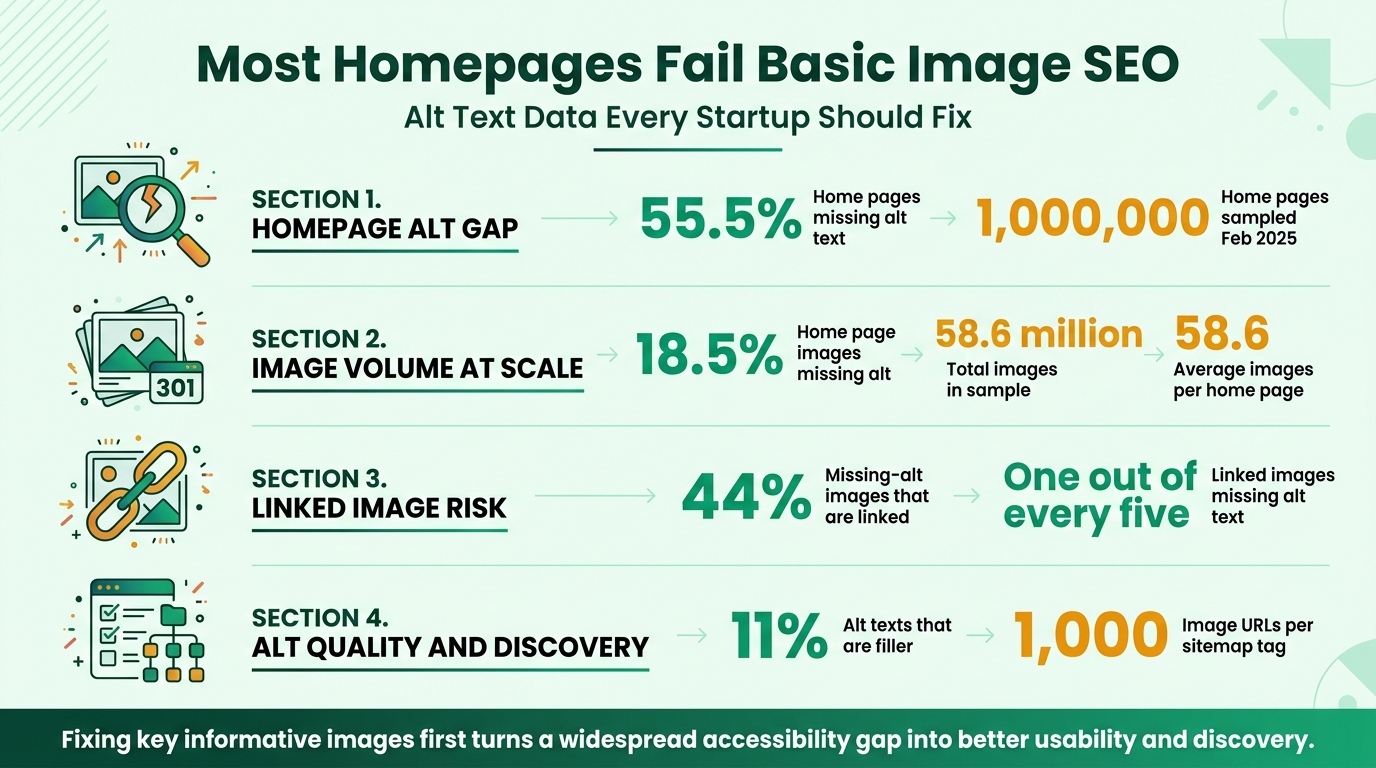
Image Alt Text Statistics for Startup Founders
Conclusion: make every image understandable and findable
Write helpful, contextual alt text for images that carry meaning, and keep it natural and free of stuffing.[1] Give decorative images empty alt text so assistive technology can skip them.[4] Make images discoverable with clean HTML, descriptive names, and sitemaps where needed.[2]
Accessibility audits still find missing alt text on many home pages.[3] Addressing the gap supports usability and helps search systems interpret images, but does not guarantee rankings.
If low visibility and time-consuming manual submissions are holding you back, use this image checklist on your site and profiles. You can also explore SR Booster’s manual directory submissions as a separate off-page visibility effort.
FAQs
Does alt text on images help SEO?
Alt text gives Google useful context about an image alongside computer vision and page content. It can support image understanding and image search, but it does not guarantee rankings or traffic by itself.
How do you write alt text for SEO?
Describe the essential information or function in natural language, taking the page context into account. Use keywords only when they fit, and describe a linked image’s destination or action rather than its appearance.
How many characters should image alt text be?
There is no strict Google limit, so aim for a concise, purposeful description. For a complex chart or infographic, keep the alt text brief and include the full data in nearby text.
Does an image file name affect SEO?
Google treats a filename as a very light clue about an image’s subject. Use a short, descriptive name instead of a camera default.
How do you make alt text decorative?
Use an empty alt attribute, written as alt=””. Screen readers then skip the image. Reserve this for images that add no information, such as dividers, background flourishes, or icons already described by nearby text.
Stop doing this manually
We list your startup in 120+ relevant directories — by hand
Every submission is done manually and delivered in a live report with profile links, logins and screenshots, so you can verify each backlink yourself. From $99, one-time.


Leave a Reply