

You can check any website’s authority score in under 30 seconds, for free, without a subscription. The catch: the best tools to check domain authority don’t all measure the same thing. “Domain Authority” is a metric Moz invented, not something Google uses[1], and every SEO vendor has its own version of it — Moz DA, Ahrefs DR, Semrush Authority Score, and Majestic Trust Flow.
Here’s the short answer on which ones you should actually use:
- Free and good enough for daily checks: Ahrefs’ free Website Authority Checker, Moz Link Explorer (free queries with an account), the MozBar Chrome extension, Ubersuggest, and Majestic’s free summary.
- Worth paying for: when you need bulk checks of 100+ URLs, historical score trends, competitor link gap reports, or API access for spreadsheets.
- What actually moves the number: new referring domains that are relevant, indexed, and followed — not the score-checking itself.
Quick Comparison: Tools to Check Domain Authority
| Tool | Authority metric | Free check available? |
|---|---|---|
| Moz Link Explorer + MozBar | Domain Authority (DA) | Yes, with a free account |
| Ahrefs | Domain Rating (DR) | Yes, no account needed |
| Semrush | Authority Score | Yes, limited daily requests |
| Majestic | Trust Flow / Citation Flow | Partially |
| Ubersuggest | Domain Authority-style score | Yes, few daily searches |
Below is how each metric is calculated, where the free tiers stop being useful, and how to turn score checks into a real link-building shortlist.
1. What Domain Authority Actually Measures (and What It Doesn’t)
Moz’s Domain Authority is a 1–100 logarithmic score that predicts how likely a domain is to rank in search results. It’s built from link data — mainly linking root domains and total links pointing at the site[1].
The logarithmic part matters more than most founders realize. Going from DA 20 to DA 30 is much easier than going from DA 60 to DA 70. A brand-new startup site can post fast early gains with a modest number of quality links, then watch progress slow down. That’s normal, not a sign your SEO broke.
The other thing to be clear about: Google has repeatedly said it does not use Moz DA or any vendor “domain authority” score in its ranking systems[1]. Treat these numbers as comparative — useful for ranking one link target against another — never as an absolute verdict on a website.
1.1 DA vs. DR vs. Authority Score vs. Trust Flow
Four metrics dominate, and they measure slightly different things:
- Moz Domain Authority (DA) — a link-based prediction of ranking ability on a 1–100 log scale[1].
- Ahrefs Domain Rating (DR) — the strength of a site’s backlink profile on a 0–100 log scale, driven by the number of unique linking domains[2].
- Semrush Authority Score — a composite that blends link power, organic traffic, and spam signals[3].
- Majestic Trust Flow and Citation Flow — Trust Flow scores link quality based on distance from trusted seed sites, while Citation Flow scores link quantity[4].
These scores are not interchangeable. The same website can show DR 55 in Ahrefs and DA 30 in Moz because the two tools crawl different parts of the web and weight links differently. Pick one metric, stick with it, and compare like with like.
1.2 When the Number Matters for a Startup
Checking authority is worth your time in four situations:
- Vetting a link target — is this directory, blog, or podcast worth the submission effort?
- Benchmarking — record scores for 3–5 direct competitors so you know the gap you’re closing.
- Tracking progress — re-check quarterly after a link-building campaign.
- Spotting drops — a sudden fall often means lost links, not a penalty.
What isn’t worth your time is vanity chasing. A niche startup directory with a modest score that sends relevant referral traffic and actual signups usually beats a high-scoring, off-topic page that nobody reads. If low organic traffic and thin lead flow are the real problems, relevance is the lever — which is exactly how our startup directory link-building service selects placements.
So which tools actually give you these numbers without a credit card?
2. Free Tools to Check Domain Authority
All of the tools below offer a genuine no-cost check. They also come with limits: daily query caps, truncated data rows, and login requirements. Fine for spot checks — not fine for bulk work.
2.1 Moz Link Explorer and the MozBar Extension
Moz Link Explorer is the original source of Domain Authority. With a free Moz account you get a limited number of queries per month, returning DA, linking root domains, and a sample of top backlinks[5].
MozBar, the free Chrome extension, is the faster option for scanning. It overlays DA and Page Authority directly onto Google search results and any page you visit — so you can run down a list of 20 directories in a single browser session without opening a new tab for each one.
2.2 Ahrefs Free Website Authority Checker
Ahrefs’ free Website Authority Checker returns Domain Rating, total backlinks, and linking domains for any URL, with no paid plan required[6]. It’s the quickest single lookup on this list.
If you only need to monitor your own site, Ahrefs Webmaster Tools is the better free route: verify your domain and you get backlink data plus Site Audit reports at no cost.
2.3 Ubersuggest, Semrush, and Other Freemium Checkers
Ubersuggest gives you a small number of free daily searches showing an authority-style domain score alongside backlink counts[7]. Semrush‘s free account allows a limited number of daily requests across Domain Overview and Backlink Analytics, which is where Authority Score lives[3]. Majestic offers a free site explorer summary with Trust Flow and Citation Flow for limited or verified lookups[4].
Two practical habits:
- Cross-check outliers. If a domain looks suspiciously strong in one tool, confirm it in a second before you invest effort.
- Don’t try bulk work on free tiers. Checking 100+ directory URLs one at a time will burn days and still hit daily caps — one reason many founders hand the research and submissions to a done-for-you directory submission service instead.
That bulk ceiling is the main reason teams eventually pay.
3. Paid Tools to Check Domain Authority: What You Get for the Money
A subscription mostly buys scale and history: unrestricted lookups, historical score trends, bulk URL analysis, link intersect and competitor gap reports, lost-and-new backlink alerts, and API access so you can pull scores into a spreadsheet. Pricing and plan names change often, so check each vendor’s pricing page rather than trusting numbers quoted in blog posts.
3.1 Ahrefs, Semrush, and Moz Pro Compared
The practical split between the three big suites:
- Ahrefs — usually preferred for backlink depth and link-profile analysis, built around Domain Rating[2].
- Semrush — the all-in-one option, with traffic estimates, keyword tools, and an Authority Score that factors in traffic and spam signals[3].
- Moz Pro — the place to get DA itself, plus a gentler learning curve and clean reporting for clients or investors[5].
3.2 Budget and Specialist Options: Majestic, Moz API, and Bulk Checkers
Majestic is the link-focused, lower-cost alternative. Its topical Trust Flow is genuinely useful for judging niche relevance — you can see whether a site’s trust comes from your category or from somewhere unrelated[4].
The Moz Links API lets you pull DA into Google Sheets or an internal dashboard, which is how most teams handle large candidate lists[5]. Be careful with cheap “bulk DA checkers” — many simply resell API data from one of the vendors above, so confirm which source metric you’re actually getting.
One paid tool is enough. Paying for two overlapping suites rarely changes a single decision.
3.3 Free vs. Paid: Side-by-Side Comparison
| Tool | Authority metric | Free tier limits | Paid plans | Bulk / API | Best for |
|---|---|---|---|---|---|
| Moz Link Explorer + MozBar | Domain Authority[1] | Limited monthly queries with a free account[5] | See Moz | Yes (Moz Links API) | DA itself + SERP overlay |
| Ahrefs | Domain Rating[2] | Free checker, no login; Webmaster Tools for verified sites[6] | See Ahrefs | Yes, on paid plans | Backlink depth |
| Semrush | Authority Score[3] | Limited daily requests | See Semrush | Yes, on paid plans | All-in-one marketing data |
| Majestic | Trust Flow / Citation Flow[4] | Free summary, limited lookups | See Majestic | Yes | Link quality and topical fit |
| Ubersuggest | DA-style domain score[7] | A few free searches per day | See Ubersuggest | Limited | Budget-conscious founders |
| Approach | Pros | Cons |
|---|---|---|
| Free tools only | No cost; enough for spot checks and monitoring your own domain; multiple tools to cross-verify | Daily and monthly query caps; truncated data; no historical trends; no bulk checks |
| One paid subscription | Unlimited lookups; historical score trends; bulk analysis; competitor gap and lost-link alerts; API access | Recurring cost; overkill before you have a real link pipeline; learning curve |
| Free tools + outsourced submissions | Spot checks stay free; the slow manual vetting and submitting is handled for you | Service cost; you still need to define your own relevance criteria |
Having the data is one thing; reading it correctly is another.
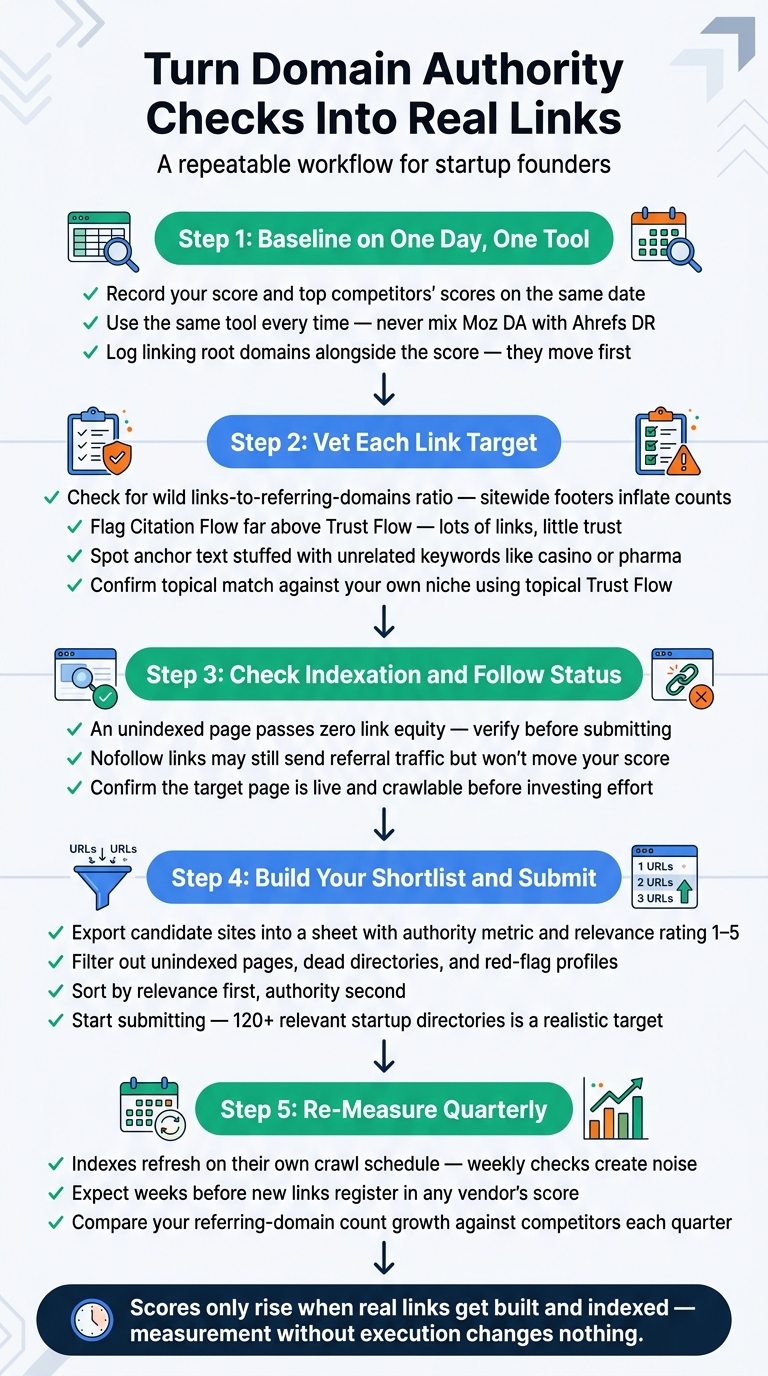
4-Step Domain Authority Link-Building Workflow for Startups
4. How to Use the Scores Without Getting Misled
A repeatable workflow beats random lookups:
- Baseline on one day, one tool. Record your score and your top competitors’ scores in a spreadsheet on the same date, using the same tool.
- Log linking root domains too. The count of unique referring domains is the underlying driver of both DA and DR[2], so it moves before the score does.
- Re-measure quarterly. These indexes refresh on their own crawl schedule, not in real time. Weekly checks just create noise.
- Check indexation and follow status before you chase a link. An unindexed page passes nothing, and links that never get indexed are one of the most common reasons a campaign shows no movement.
4.1 Red Flags in a Domain’s Backlink Profile
Look past the headline number for these warning signs:
- A wild links-to-referring-domains ratio — millions of links from a few hundred domains usually means sitewide footers or widgets.
- Citation Flow far above Trust Flow — lots of links, little trust[4].
- Spam-adjacent signals in Semrush, which are baked into Authority Score for exactly this reason[3].
- Anchor text stuffed with unrelated commercial keywords (casino, loans, pharma) on an otherwise normal-looking site.
- Topical mismatch — check topical Trust Flow against your own niche[4].
This is why a “DA 50” link farm is a worse bet than a modest, well-maintained startup directory that real founders and investors browse.
4.2 Turning Score Checks into a Link-Building Shortlist
Measurement only pays off when it ends in submissions:
- Export your candidate sites into a sheet.
- Add your chosen authority metric and a relevance rating (1–5).
- Filter out unindexed pages, dead directories, and the red flags above.
- Sort by relevance first, authority second, and start submitting.
Step 4 is where most founders stall. Researching and manually submitting to 100+ directories — each with its own form, login, and approval quirks — eats weeks of time you’d rather spend on product. That’s the gap SR Booster’s manual directory submission service fills: listings built by hand across 120+ relevant startup directories, delivered as a report with live profile links, logins, and screenshots.
5. Key Takeaways
- Authority scores are third-party estimates, not Google ranking factors[1].
- Never compare across tools. Moz DA, Ahrefs DR, Semrush Authority Score, and Majestic Trust Flow use different inputs and different indexes.
- Free tiers are enough for occasional checks and monitoring your own domain.
- Pay up once you need bulk checks, historical trends, or competitor gap analysis.
- Relevance, indexation, and referring-domain growth matter more than any single number.
- Scores only rise when real links get built and indexed — so pair measurement with consistent outreach or directory submissions.
Once you’ve picked your tool and built your shortlist, the work that’s left is execution. If manual submissions are the bottleneck, see how SR Booster handles startup directory listings and keep your own time on the product.
FAQs
Is Domain Authority a Google ranking factor?
No. Domain Authority is a metric created by Moz to predict ranking potential, and Google has stated it doesn’t use Moz DA or any vendor authority score in its ranking systems[1]. It’s still useful for comparing two link targets against each other.
What is a good Domain Authority score for a new startup website?
New domains typically start in the low single digits. Because the scale is logarithmic, early gains come quickly — reaching the 20s is realistic with a solid base of relevant links, while the 60s and above generally belong to established publishers[1]. Compare yourself to 3–5 direct competitors rather than an absolute target.
Can I check domain authority for free without creating an account?
Yes. Ahrefs’ free Website Authority Checker returns Domain Rating, backlinks, and linking domains without a login[6]. Moz Link Explorer requires a free account for its limited monthly queries[5], and Ubersuggest allows a few free searches per day[7].
Why do Moz DA and Ahrefs DR show different scores for the same website?
They use separate crawlers, separate link indexes, and different formulas. Moz DA predicts ranking ability from its own link data[1], while Ahrefs DR measures backlink profile strength based on unique linking domains[2]. A site can easily be DR 55 and DA 30, so stick to one metric when comparing candidates.
How long does it take for domain authority to increase after building backlinks?
Scores update when the vendor’s crawler discovers and processes your new links, not the moment a link goes live — so expect weeks, and re-check quarterly rather than weekly. Links on unindexed pages may never register at all, which is why indexation checks belong in your workflow.
Stop doing this manually
We list your startup in 120+ relevant directories — by hand
Every submission is done manually and delivered in a live report with profile links, logins and screenshots, so you can verify each backlink yourself. From $99, one-time.



Leave a Reply