

If you want to disavow toxic backlinks, here is the short answer: most startups never need to. Google says it can assess which links to trust without guidance, so most sites will not need the tool[1].
Low organic traffic and weak rankings can make strange links in a backlink checker feel scary. This guide shows when to act, when to leave links alone, and how to keep good directory links while avoiding real link spam.
- Use the tool only in a narrow case: you have a considerable number of spammy, artificial or low-quality links and a manual action or likely manual action[1].
- Disavowing asks Google to ignore links. It does not delete them from your profile, and Google is not obligated to respect the request[4].
- Not every directory is harmful. Google names low-quality directory or bookmark links as link spam, not every relevant, moderated startup directory[2]. Vet listings for audience fit and editorial quality[5].
- Incorrect use can harm performance, and processing takes a few weeks, so audit carefully before you upload anything[1].
When to disavow and when to leave links alone
Google sets a two-part test. Disavow only if you have a considerable number of spammy, artificial or low-quality links and a manual action or likely manual action[1]. Both conditions must apply. The tool is advanced, not routine maintenance.
Act when Search Console shows a Manual Actions notice for unnatural links, or you know you or a hired SEO built the problem. Examples include paid links that pass ranking credit, private blog networks, and large-scale automated directory or comment spam you created[4].
Leave links alone when you did not create them. That includes unsolicited spam, isolated odd domains, and alarming tool flags with no manual action. Google says it works to prevent actions on third-party sites from negatively affecting your site and typically ignores known spam links[1][3].
If you are conflicted about a genuine pattern that looks manipulative, filing to be safe is acceptable. It is the exception, not a monthly chore.
If you’re conflicted and just want to be sure, it’s totally fine to set up & use disavow files. If you notice that the bulk of the problems are from a few TLDs, you can also disavow the whole TLD. The disavow file is a tool, not a religion :-). Most sites don’t need it, but that’s not all sites
— John Mueller, as quoted in Search Engine Journal
What a manual action looks like for a startup
In Search Console, check Security & Manual Actions > Manual Actions, and review your message center. Look for a notice titled “Unnatural links to your site.” After cleaning up links or disavowing them, submit a Request Review through the Manual Actions report[4].
A ranking drop alone does not prove a link penalty. Site changes, content issues, or broad spam updates can also affect performance. Without a manual action or clear evidence that you built manipulative links, do not assume links caused the drop[1].
How to audit backlinks and judge directory quality
Start in Search Console under Links. Review Top linking sites, Top linked pages, and Top linking text for unknown domains and spammy money-keyword anchors. Drill from a linking site to your target page and then to the exact linking page[3].
The report is a sample grouped by root domain, not a full inventory. Tables are capped at 1,000 rows, with exports up to 100,000 rows for Latest links and More sample links. It may omit non-indexed or deduplicated URLs, does not identify nofollow links, and may show removed pages[3].
Apply this link-review checklist to each suspect: how was the link obtained, does the linking page match your audience and topic, is the content thin or stuffed with keywords, is the anchor manipulated, does the site look legitimate or built for link trading, and how easily could anyone buy the same link?
Treat third-party toxicity scores as triage only. A vendor label like “25% toxic” or “50% potentially toxic” is tool output, not a Google measurement[8]. Verify each suspect manually; a tool label is not Google’s judgment.
The concept of toxic links is made up by SEO tools so that you pay them regularly.
— John Mueller, quoted by Search Engine Roundtable from a Reddit discussion
During manual inspection, look for thin, spammy or auto-generated content, keyword stuffing, irrelevance, excessive ads or pop-ups, missing contact information, broken links, and outdated design[5].
Startup directory-quality rubric [ORIGINAL]
| Signal | Keep | Disavow-or-avoid |
|---|---|---|
| Reputation | Well-known in your niche or startup ecosystem | Unknown site with no reputation, created solely for links |
| Moderation | Human review before a listing goes live | Instant auto-approval with no verification |
| Unique descriptions | Original company description and correct details | Duplicated or thin listings scraped from other sites |
| Audience traffic | Real visitors and relevant categories | No real audience, excessive ads, or broken links |
| Anchor-text rules | Brand-name anchor or natural company name | Required keyword-rich anchor for SEO |
| Fee model | Transparent fee for review or an enhanced profile | Payment for a guaranteed followed link or false authority claims |
Use the “Disavow-or-avoid” column as a reason to investigate, not as an automatic decision to disavow. Paid or sponsored placements for advertising are not a policy violation when qualified with rel="nofollow" or rel="sponsored"[2].
Researching directories one by one can take founders weeks. SR Booster agents can help by selecting relevant directories and manually creating listings.
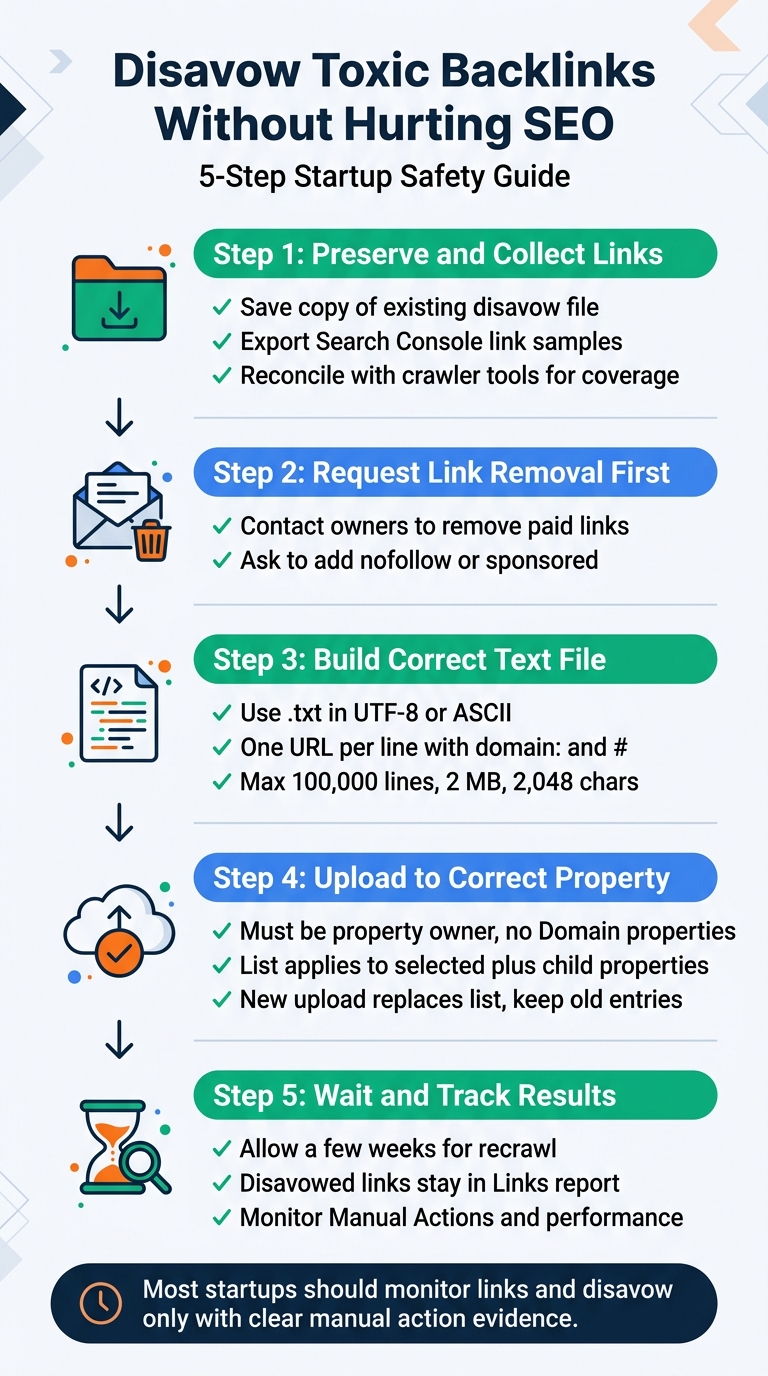
5-Step Toxic Backlink Disavow Guide for Startups
How to disavow toxic backlinks in Search Console step by step
Step 1: Preserve and collect. Save a copy of your current disavow file if one exists. Export link samples from Search Console and reconcile them with crawler tools for broader coverage, since Search Console provides a sample[3].
Step 2: Try removal first. For links you control or paid for, contact site owners and ask them to remove the links or qualify them appropriately. Google recommends removing spammy or low-quality links first where possible[1].
Step 3: Build the file correctly. Use a text file ending in .txt, encoded in UTF-8 or 7-bit ASCII. Put one URL or domain per line, use domain: for a whole domain and # for comments, and do not try to disavow a subpath such as example.com/en/[1].
The file limits are technical constraints: a maximum of 100,000 lines, including blank and comment lines, 2 MB total, and 2,048 characters per URL[1]. Example lines:
# removal requested on 2026-09-10, no reply
domain:spam-example.com
https://example-directory.com/listing/spam-page.html
Step 4: Upload for the correct property. You must be a property owner to upload a list. The tool does not support Domain properties, and the list applies only to the selected property and its child properties. If you have separate http and https URL-prefix properties, upload the relevant list for each. Each new upload replaces the existing list, so include all previous entries you want to keep[1].
Step 5: Wait and track correctly. After a successful upload, Google may need a few weeks to incorporate the list as it recrawls and reprocesses pages[1]. Disavowed URLs will still appear in the Links report, so monitor Manual Actions and organic performance rather than expecting the report to clear[1].
Why broad domain rules and whole-TLD disavow are high risk
Prefer page-level or specific-domain rules. Use domain: only for clear spam clusters where links across the domain are manipulative[1].
An entire TLD can technically be disavowed with the domain: directive, but it is a big hammer with no carve-outs. Legitimate sites may exist on the same TLD, and the capability has been reported as possible since the tool began[7].
It’s the domain: directive, I don’t know if it’s explicitly called out for the whole TLD in the documentation (it’s quite a big hammer :-)). It’s been possible since the start, but I imagine the “annoying” TLDs change over the years. Some TLDs are very cheap, and have “friendly” TOSs…
— John Mueller, as quoted in Search Engine Journal
How to prevent future risks and monitor SEO health
Recheck Links report samples regularly. Watch Top linking text for money-keyword spikes that suggest new manipulation. Keep a simple log of where and how your startup was submitted, including dates, anchors, and logins[3].
Build safely by choosing relevant, moderated directories. Avoid buying links that pass ranking credit, excessive exchanges, automated link creation, hidden links, and widget or footer spam. Qualify paid or sponsored placements with nofollow or sponsored[2].
A large backlink count does not guarantee traffic. One site in a cited example had over 2.6 million backlinks while traffic fell from more than 36,000 visitors per month to zero over two years[5].
Google’s August 2025 spam update ran from August 26 to September 22 and applied globally across all languages[9]. A ranking change during that period does not by itself show that the update affected your site or its backlinks.
Conclusion: protect SEO health without over-disavowing
Your default is no disavow. Act only when you see a considerable manipulative pattern alongside a manual action or likely manual action.
Verify tool scores by hand, keep relevant moderated directories that bring the right audience, and document every submission.
If you file, replace the list correctly for each property and expect a delay of weeks, not an automatic ranking gain. Startups looking for vetted directory coverage and live reporting can consider SR Booster’s one-time service, with a correction support window depending on the plan.
FAQs
What is a toxic backlink?
“Toxic backlink” is a label often used by SEO tools for a link that looks spammy, artificial, or low-quality. Focus on how the link was created and whether it is part of a manipulative pattern, rather than relying on the label alone.
When should you use the Google Disavow tool?
Consider it when you have a considerable number of manipulative links and a manual action or likely manual action. If the links appeared without your involvement and there is no manual action, they usually do not require a response.
How do I check for toxic backlinks without relying only on a toxicity score?
Use Search Console to review linking sites, linked pages, and anchor text. Then inspect how each link was obtained, whether the page fits your audience, the quality of its content, and whether its anchor or site appears designed to manipulate rankings.
What is the format of a disavow file?
Use a .txt file encoded in UTF-8 or 7-bit ASCII, with one URL or domain per line. Use domain: for an entire domain and # for comments; the file can contain up to 100,000 lines and 2 MB, with a maximum URL length of 2,048 characters.
Are directory listings safe for startups in 2026?
They can be appropriate when a directory is relevant, moderated, and useful to a real audience. Be cautious of thin duplicate listings, instant approval without review, and requirements for keyword-rich anchors or followed paid links.
Stop doing this manually
We list your startup in 120+ relevant directories — by hand
Every submission is done manually and delivered in a live report with profile links, logins and screenshots, so you can verify each backlink yourself. From $99, one-time.



Leave a Reply