

An SEO friendly URL structure is a simple, crawlable address with readable words that tells users and Google what the page is about. If you run a startup, you do not need clever tricks. You need one clear address per page that stays stable while you build content and links.
- Build readable addresses with real words, hyphens, lowercase, and few parameters[1].
- There is no Google character target; top-10 URLs averaged 66 characters in one large correlation study with only a very slight length relationship[4].
- Pick one stable canonical address and reuse it everywhere, including directory profiles and backlinks, using consistent canonical signals[3].
- Preserve established URLs; when change is unavoidable, use a direct permanent server-side redirect and allow weeks to months for signals to settle[2][6].
What makes an SEO friendly URL structure readable and crawlable
Start with URLs that meet the URL standard and use common encoding, so crawlers and browsers can parse them consistently[1].
Do not use URL fragments like #section to show different content. For JavaScript-driven content changes, use the History API instead. For parameters, stick to familiar patterns so Google can interpret them correctly[1].
Use words, hyphens, and lowercase consistently
Use readable words, not long IDs. For example, Google recommends a descriptive path such as https://example.com/wiki/Aviation over https://example.com/index.php?topic=42&area=3a5ebc944f41daa6f849f730f1[1].
Separate words with hyphens, not underscores. For example, https://example.com/summer-clothing/filter?color-profile=dark-grey is recommended, while https://example.com/summer_clothing/filter?color_profile=dark_grey and joining words as https://example.com/greendress are not[1].
URLs are case sensitive. Google treats /APPLE and /apple as distinct URLs, so if your server treats them the same, convert all text to one case[1]. For startups, that means using lowercase consistently.
Set this pattern early. For example, use /pricing/ instead of /index.php?topic=42&id=xyz, and /ai-meeting-notes/ instead of /AI_MeetingNotes. Short, lowercase, hyphenated slugs are easier to read, share, and remember.
Keep parameters and encoding simple
Trim parameters that do not change content. Tracking codes, session IDs, sort orders, and filter combinations can multiply one page into many crawlable URLs. When you need parameters, use = between key and value and & for extra pairs, with a comma for multiple values for the same key, such as color=purple,pink,salmon. Percent-encode non-ASCII characters where needed[1].
Google’s URL guidance gives no character-count target[1]. An observational study of 11.8 million search results, first published in 2016 and updated in 2025, found the average top-10 URL was 66 characters and position #1 averaged 9.2 characters fewer than position #10. The study described this as a very slight correlation, not a target or a ranking formula[4].
“We found a very slight correlation between URL length and rankings.”
— Brian Dean, author [4]
Shortening a URL does not cause higher rankings. Use as many words as you need for clarity, then stop.
How to organize startup pages without deep folders
Overly complex URLs with multiple parameters can create many identical or similar pages. Google says Googlebot may then consume much more bandwidth than necessary or be unable to completely index your content[1].
Let navigation and internal links show relationships. Do not add /category/subcategory/year/ folders just to insert keywords. Deep folders can make later restructuring more involved.
Choose flat or grouped paths and stick to them
For core startup pages, use flat paths. Add one stable group only when your content volume requires it, such as /blog/, /resources/, or /features/. Choose a pattern before you build links and keep it consistent.
| Path type | When to use | Startup example | Risk of changing later |
|---|---|---|---|
| Flat path | Core pages such as pricing and company information | Example: /pricing/, /about/, /contact/ | Low while stable; higher if you later nest the pages |
| One-level category for content | A growing blog or resource library | Example: /blog/saas-onboarding-checklist/ | Renaming the category affects its child URLs |
| One-level group for product | Repeated product or use-case pages | Example: /features/invoicing/, /resources/seo/ | Moving pages to a new group changes their URLs |
Use startup URL examples for product, services, blog, and profiles
Keep patterns predictable. Example SaaS path: /features/invoicing/. Example services path: /services/pitch-deck-design/. Example blog path: /blog/startup-directory-submission-checklist/.
Point directory profiles and guest bios to your homepage or one service page, not to filtered variants. Avoid dates, database IDs, uppercase, and filter-laden addresses such as the example /Blog/2024?id=889&sort=desc&session=abc. If filtered or calendar URLs waste crawl bandwidth, check Google’s current crawl-management guidance before blocking anything[1].
How to keep one canonical address for search and backlinks
Google clusters similar pages and picks one representative canonical. Redirects, sitemap inclusion, HTTP/HTTPS status, and rel=canonical are signals in that choice, but your preference is only a hint and Google may pick differently. Google crawls the canonical most regularly and duplicates less often to reduce crawl load[3].
That matters for link building because backlinks point to a destination URL. In one 11.8-million-result dataset, about 95% of pages had zero backlinks. In the comparison that excluded zero-backlink pages, position #1 averaged 3.8 times more backlinks than positions #2–#10; these are dataset correlations, not promises[4].
Pick the preferred host and secure version once
Decide https or http, www or non-www, trailing slash, and lowercase, then use that exact form in your sitemap and internal links. Add self-referencing rel=canonical annotations to key templates so each page signals its preferred address[3].
Reuse the same destination in every directory listing
Use the same canonical URL in investor databases, review sites, social profiles, and startup directories. Use tracking parameters only when you need campaign measurement; for directory profiles, prefer the clean destination URL. If tracking or filter parameters create crawlable duplicates, use consistent canonical signals where appropriate[1][3].
Manual research takes time when you are also dealing with weak rankings and low organic traffic. SR Booster agents select the startup’s canonical destination and reuse it across manual directory listings, so profiles and backlinks point to one address. The live report includes profile links, logins, and screenshots.
When to keep a URL and how to redirect a change
Preserve established URLs unless a site-wide restructure or migration requires a change. A redirect helps users and search engines find the new location, but it does not make a change risk-free.
Preserve established URLs unless restructuring
Google tracks both redirect source and target. One becomes canonical, while the other may remain an alternate name that still appears when a query suggests users trust the old URL more[2].
As reference points, not deadlines, canonicalization changes typically take 1–3 weeks and can take months when signals conflict; site moves typically take 1–3 months and can take 6 months to a year or more[6]. These ranges come from an attendee recap of a Gary Illyes session.
Launch and migration checklist
Use this checklist when launching or moving a site:
- Lock HTTPS, your preferred host (www or non-www), and your trailing-slash rule.
- Use lowercase paths consistently.
- Set self-referencing canonicals using the rule from the previous section.
- Update internal links to the preferred URLs.
- Update the XML sitemap to list only preferred URLs.
- Implement direct one-to-one permanent server-side redirects: 301 or 308 for permanent moves, and 302, 303, or 307 only for truly temporary moves[2].
- Avoid chains like A->B->C; point A directly to C.
- Verify that each destination renders and returns a 200 status.
Server-side redirects have the highest chance of being interpreted correctly[2].
How to check new and changed URLs after launch
After launch, inspect key templates, submit the updated sitemap in Search Console, and check that internal links resolve. For individual high-priority pages, use URL Inspection to check Google’s status[5].
Separate reporting delay from real indexing status
During a reported Search Console delay in December 2025, Google said the issue affected reporting, not crawling, indexing, or ranking[5]. A stale aggregate report does not by itself mean a page failed to crawl or index; check the individual URL.
These attendee-reported timing ranges are reference points, not deadlines[6]:
| Process | Typical timing | Slowest reported timing |
|---|---|---|
| Discovery of a new URL | About 20 hours | Weeks to never |
| Refresh of a known URL | About 30 days | Weeks to never |
| Sitemap processing | About 24 hours | Up to 14 days, or never for quality reasons |
| End-to-end indexing | About 1.5 hours | Months, or never for quality reasons |
If a canonical change takes longer than the typical window, check for conflicting canonical, redirect, and sitemap signals before assuming the page has a deeper problem.
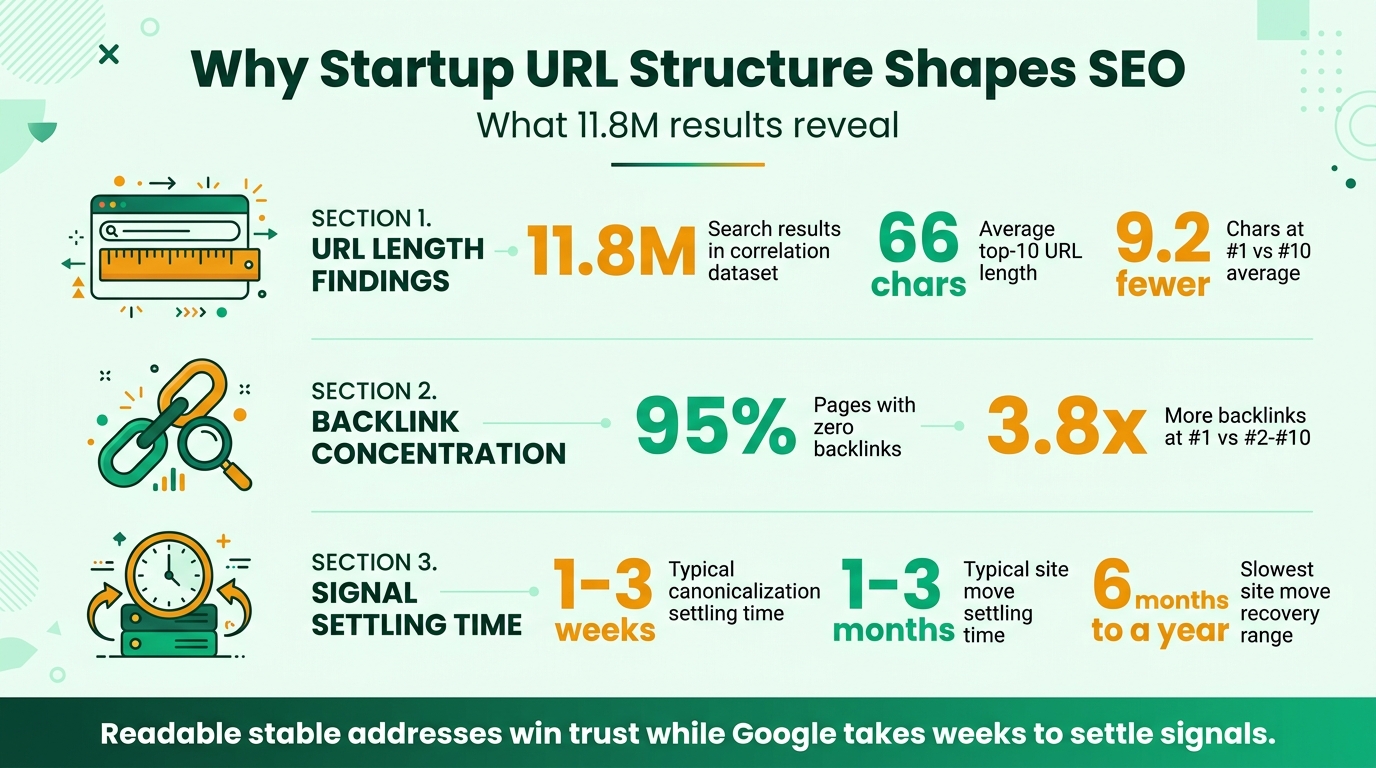
SEO Friendly URL Statistics For Startups
Conclusion: keep URLs stable, simple, and consistent
Use readable, hyphenated, lowercase addresses and keep your site paths shallow and stable. Reuse one canonical destination in listings, internal links, and your sitemap. Preserve established URLs, redirect directly and permanently only when needed, and check important pages individually after launch.
If manual directory research and consistent listings take too long, SR Booster can manually list your startup and report live profile links within about two weeks.
FAQs
How do I make a URL SEO-friendly?
Start with a few readable words that describe the page, joined with hyphens. Keep the path lowercase and remove parameters that do not change the page. Use your preferred address consistently across your site and external profiles.
How long should an SEO-friendly URL be?
There is no fixed character count to aim for. Choose the shortest wording that still makes the page clear, and do not remove useful words just to shorten the address.
Should I change an existing URL slug?
Usually, leave it as it is, especially if people already visit or link to it. If a rebrand, restructure, or migration makes a change necessary, redirect the old address directly to the replacement.
Do URL redirects hurt SEO?
A permanent redirect tells Google that the destination should be treated as canonical, while temporary redirect codes do not send that same signal[2]. Use a direct server-side redirect for a permanent move and give search systems time to process it.
What is the best URL structure for a small startup site?
Put core pages such as pricing, about, and contact at the root level. Add a single grouping, such as /blog/ or /features/, when you have enough related pages to organize. Choose your host, letter case, and trailing-slash pattern once and apply them consistently.
Stop doing this manually
We list your startup in 120+ relevant directories — by hand
Every submission is done manually and delivered in a live report with profile links, logins and screenshots, so you can verify each backlink yourself. From $99, one-time.


Leave a Reply