

To check indexed backlinks, search the exact listing URL in Google, confirm the backlink remains in the page source, then use Search Console as corroboration and recheck on a schedule. Each check answers a different question, so a missing result is not a final verdict.
- A directory listing can be live, crawlable, indexed, and attributed — four separate facts.[3] [2]
- Search Console confirms links Google attributed to your verified site, not the index status of each third-party listing URL.[2]
- New listings can take days to weeks to be crawled, so a missing result may not mean anything yet.[1] [5]
- A clean, deduplicated list makes it easier to track many URLs than one-off spot checks.[2] [6]
What indexed means for a startup directory listing
Crawling is Google following links and sitemaps to build a list of public URLs to visit. Indexing is analyzing a page’s content and meaning, then storing it in Google’s repository.[3] For a directory, Google must first discover your profile page, then decide whether to store that exact URL.
Keep four states separate. The listing URL is live and loads for a visitor. Google can crawl it as a public page. Google has indexed that exact URL variant. Google has attributed the link on that page to your startup site.
An indexed page does not automatically mean Google has attributed its link to your site. The Links report does not label nofollow links, combines duplicate links after normalization, and groups data by root domain while grouping destination pages by canonical URL.[2] Until Google has found and stored a listing, treat its link status as unverified rather than confirmed attribution.
A robots.txt disallow does not settle the question. The file manages crawl traffic, and a disallowed URL can still appear in results if linked from elsewhere; the URL and possibly anchor text may appear.[4] Check the exact URL and the page source instead of relying on robots.txt alone.
Check indexed backlinks one listing at a time
If you receive a live report with profile links from SR Booster’s manual directory submission service, start with those exact listing URLs. The service delivers profile links, logins, and screenshots after its agents create the listings, usually within about two weeks.
| Check | Purpose | Input you use | What a negative proves |
|---|---|---|---|
| site: exact-URL search | See if Google has stored that listing variant | Full profile URL, such as site:https://directory.com/startups/acme | Not found for that variant yet; not a permanent verdict |
| Page-source link check | Confirm the backlink is still live and readable | Raw HTML of the listing; search for your domain | The link may be missing from the HTML or use a different destination |
| Search Console attribution check | Check whether Google reports the link to your verified site | Links > External links, filtered by target page and linking site | Inconclusive on its own because the report is sampled and delayed |
Run the exact-URL search
Copy the full listing URL hosting the backlink, not the directory homepage. Search site:https://directory.com/your-listing in Google. A result means Google found that URL variant; no result means it has not appeared in results for that check.
Normalize the URL before judging the result. Check the intended http or https version, www or non-www, trailing slash, and tracking parameters. Test one clean variant at a time, then recheck later rather than declaring it dead on day two.
Confirm the link is still live and readable
Open the listing, view its page source, and search for your startup domain. Confirm the anchor and destination URL, then follow any redirects to make sure the destination resolves as intended. This catches cases where the listing is indexed but your link has been removed.
Record the rel attribute and any meta robots or canonical tag visible in the page source. A third-party checker finding a link is not proof that Google indexed the page. In one outreach campaign, filtering 1,986 unvetted URLs through deduplication and removal of nofollow, UGC, or sponsored links left 902 prospects.[6] Keep legitimate listings for referral value, but separate those rel attributes from equity expectations.
What Search Console proves about directory links
Search Console shows data for a property only after you verify ownership.[3] You cannot use it to see a directory’s own indexing data; it reports links Google has associated with your site.
Go to Links > External links > Top linking sites or Top linked pages, filter by target page and linking site, and export the available data as a CSV file.[2] Use the export as corroboration, not as an index API.
The report is a sample, not a complete list, and its tables are limited to 1,000 rows.[2] It includes links Google found over time that may now be dead, may omit non-indexed or deduplicated pages, gives no index status for each referring URL, and does not label nofollow links.
URL Inspection does not fill that gap for directories. It is available only to owners or full users of a verified property, has a submission quota, and repeated requests do not make Google crawl faster.[1] You cannot request indexing for a directory URL you do not manage.
Presence in the Links report supports that Google found and attributed the link at some point; it does not prove the link is still live. Absence is inconclusive because the report is sampled and delayed, so check the exact listing URL and recheck later.
Track many directory listings without manual rechecks
One-by-one checks do not scale when you have a large batch of submissions. Manual directory research already takes time, and checking every URL by hand can create false alarms when variants do not match or a listing is new.
Build one audit sheet and reuse it for each group of listings:
- Listing URL as published
- Directory name
- Publish date
- Live-link check date and result
- Index-check date and result
- Rel attribute (nofollow, UGC, sponsored, or none shown)
- Target URL on your site
- Next action and recheck date
Before bulk checks, remove duplicate listing URLs, standardize protocol and trailing slash, and strip tracking parameters that do not change the page. Keep separate listings from the same directory, and group them by referring domain for reporting. Search Console also combines duplicate links and groups data by root domain and canonical URL, so compare like with like.
For corroboration, use the landing-page exports. Latest links and More sample links can each contain up to 100,000 rows; Latest links are sorted by discovery date, which helps when reviewing recent listings.[2]
Log each acquisition date, then recheck cohorts at two weeks, one month, and three months. Flag links that shift from indexed to not found, and look for site-wide drops instead of chasing a 100% ratio. Monthly checks fit the reported typical refresh time of about 30 days for a known URL.[5]
One 2020 outreach campaign sent 515 emails, delivered 473, and earned 36 editorial links from 32 unique websites; it was not a directory-submission campaign.[6] Domain Rating in that study is an Ahrefs metric, not a Google metric, and the article notes that metrics such as DR and traffic are not foolproof.[6]
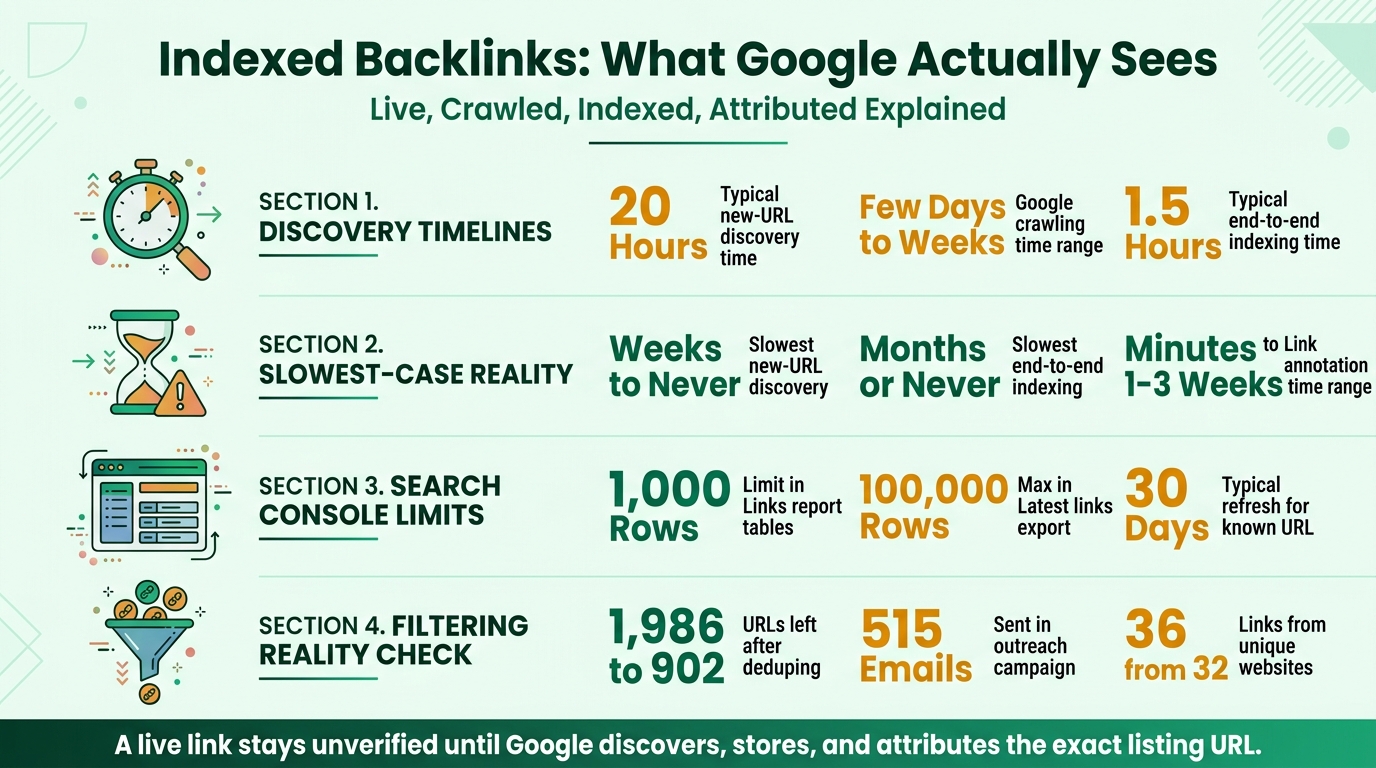
Indexed Backlink Timing Statistics for Startups
When Google has not found the link yet
You cannot request indexing for a directory profile you do not manage; the sitemap is the directory owner’s responsibility.[1] If URL Inspection is unavailable for that URL, wait and verify it again later.
Google says crawling can take a few days to a few weeks.[1] As reported in a ROAST recap of a Google analyst session, new-URL discovery was about 20 hours in typical cases and weeks to never in the slowest cases; link annotations ranged from minutes to 1–3 weeks typically and months in the slowest cases. The recap also reported end-to-end indexing at about 1.5 hours typically, with the slowest cases taking months or never.[5] These are reported ranges, not promises for a specific listing, and delays can stack because a page must be crawled before it can be indexed.
Diagnose the listing in this order:
- Too new or never discovered? Compare its publish date with your next scheduled check.
- Not publicly accessible? Check for a login wall, content that appears only after JavaScript interaction, redirects, or a 404.
- Crawl controls? Look for robots.txt disallow, meta noindex, or a canonical pointing elsewhere. A disallowed URL can still appear in results if linked from elsewhere.[4]
- Orphaned or thin listing? Check for a lack of internal links or sitemap entry, duplicate profile text, or a directory whose pages are largely absent from search results.
A never-indexed listing is different from one that was indexed and later disappeared. Both are also different from a ranking drop, canonical change, or redirect on your own site, so record what happened before deciding what to fix.
Wait and recheck first. You can share the listing URL or link to it from your own site to help people discover it, and ask the directory owner to fix noindex, canonical, or sitemap issues. Keep useful referral listings even if they are slow to appear, and deprioritize directories with persistent non-discovery across multiple checks.
Conclusion: keep the links Google can find
Separate live, crawlable, indexed, and attributed. Check the exact URL and page source, use Search Console as corroboration rather than an index API, and track listings in cohorts over time.[3] [2]
Judge directories by relevance and visibility: prioritize legitimate pages that remain discoverable and can send qualified referrals. Bulk submissions cannot force Google to index a page.
If you have many listings and limited time, SR Booster’s manual startup directory submission service provides relevant listings and a live report with profile links, logins, and screenshots.
FAQs
How do I check if a backlink is indexed in Google?
Search Google for the exact listing URL with site: and the full path, then check the page source for your domain and anchor. If the URL appears and the link is present in the source, both checks have a positive result; if not, normalize the URL and recheck later. Use Search Console Links as supporting evidence, not as a per-URL index test.
Does a backlink count if the page hosting it is not indexed?
If the source page has not appeared in Google’s index, treat the backlink’s status as unverified rather than confirmed. Search Console may not report it, and its Links report cannot prove the index status of each referring URL. Keep the listing if it has referral value, and check the source page and attribution again over time.
How long does it take for a new directory backlink to be indexed?
Google says crawling can take a few days to a few weeks, while reported observations put typical new-URL discovery at about 20 hours, with slowest cases stretching to weeks or never.[1] The reported figures are context, not a timeline for any one listing, so check again at planned intervals rather than relying on a deadline.[5]
Can I use Google Search Console to check the index status of a backlink page?
No, not directly for a third-party page. Search Console shows sampled links Google has attributed to your verified property, including links that may now be dead, and it does not label nofollow links.[2] URL Inspection and indexing requests are for URLs you manage, so use the exact-URL check for the directory listing itself.[1]
Why is my backlink live but not indexed?
The listing may be too new for Google to have crawled it. Other possibilities include a login wall, redirects or a 404, robots.txt disallow, meta noindex, a canonical pointing elsewhere, an orphaned page, or thin duplicate content. Check that the link is present in the source, ask the directory owner to fix page-level blocks, and recheck later.
Stop doing this manually
We list your startup in 120+ relevant directories — by hand
Every submission is done manually and delivered in a live report with profile links, logins and screenshots, so you can verify each backlink yourself. From $99, one-time.


Leave a Reply